Can Claude Generate Images? Yes, With One Connector
Claude can't make photos on its own. Here's how to connect it to an image tool in a few clicks and make product images right in the chat.
No. Claude can't make photos or illustrations on its own. But you can connect it to an image tool in a few clicks, and then ask for images right in the chat.
This post covers what Claude can make by itself, how to connect an image tool, and what you get when that tool starts from your own product photo.
What Claude can make by itself
Claude's help page is plain about it: Claude "doesn't generate photos or illustrations the way image-generation tools do."
What it can make is visuals built from code: diagrams, charts and small interactive graphics, drawn in HTML and SVG right in the conversation. That feature is in beta on Claude's web and desktop apps. Claude can also look at images you upload and tell you what's in them.
That helps with a sales chart or a diagram of your returns process. It won't give you a photo of your candle on a holiday table.
How to get real images in Claude
Claude can use other tools through connectors. A connector links Claude to an outside service. When you ask for something that service does, Claude asks the service to do it and tells you what came back. The open standard behind connectors is called MCP, the Model Context Protocol.
Connect an image tool and you can ask Claude for images in plain words. The tool makes the images. Claude does the asking.
You don't need a paid plan for this. Custom connectors work on every Claude plan, and the free plan allows one.
Connect Gavana to Claude
Gavana makes product images and ads for online stores, and it has a connector. Here is the setup in Claude on the web or in the desktop app:
- Copy Gavana's address:
https://app.gavana.ai/mcp - In Claude, open Customize → Connectors, click + Add, then Add custom connector.
- Name it Gavana, paste the address, and follow the prompts to Add it.
- Click Connect and sign in to Gavana.
- In a new chat, check that Gavana is on: click the + button at the bottom left, then Connectors.
That's the whole setup. Our MCP page has the same steps for ChatGPT, Claude Code and Codex.
One more thing before you ask for images: save your product in Gavana once, with a good photo of it. That photo is where every image starts.
Then ask for what you need
Write it the way you'd brief a person:
Make three ad images of my Ember candle: one for autumn, one for the holidays, and one for our 20% off sale.
Claude passes the request to Gavana. Gavana starts from your saved candle photo, and the finished images land on your Gavana canvas.
Why your own photo matters
An image tool that works from words alone has never seen your product, so it makes one up. The label is wrong, the jar is a different shape, the wax is the wrong colour. That might pass for a blog header. It won't pass for an ad, because the customer gets the real thing in the mail.
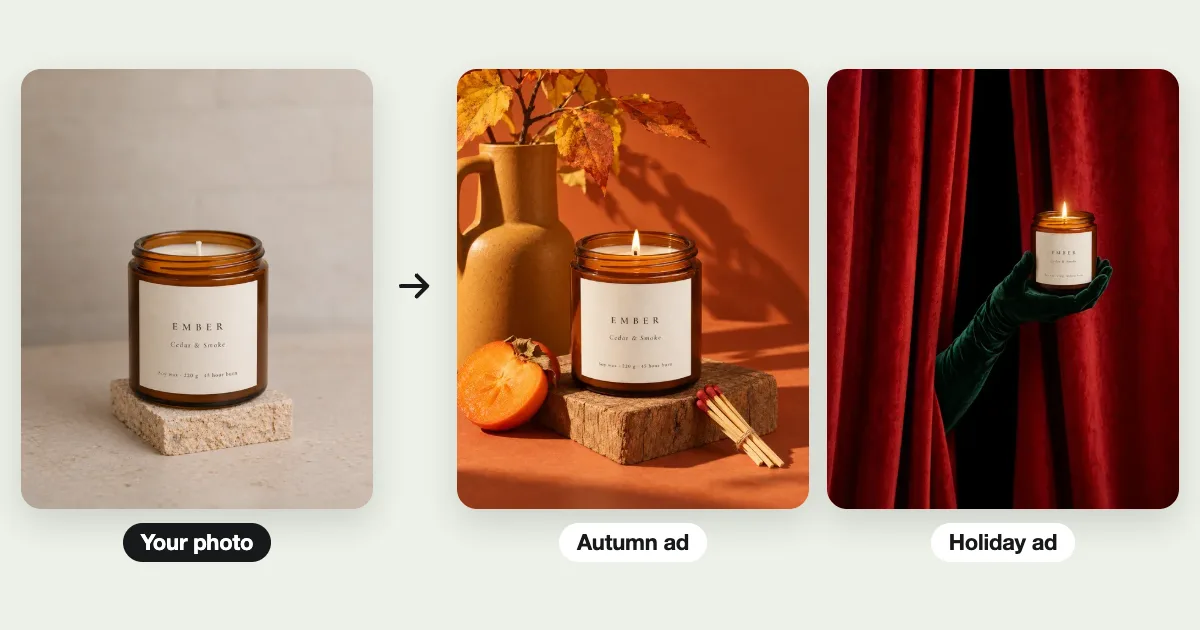
Gavana starts every image from your product photo, so the product in the ad is the one you sell. Here is one photo of a candle and three ads made from it:
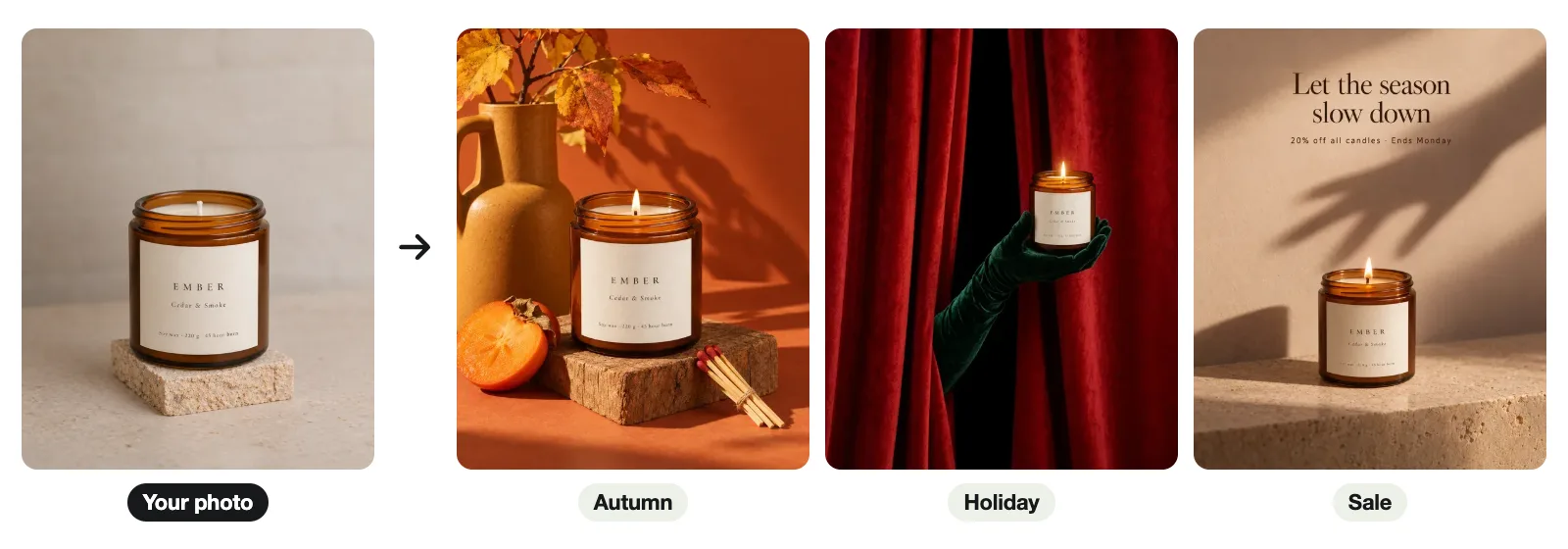
The jar, the label and the name are the same in all three. That's what makes them usable as ads.
Claude or ChatGPT for images?
ChatGPT can make images by itself. Claude needs a connector first. So if you just want a quick picture for a slide, ChatGPT is fewer steps.
For a store, the image tool matters more than the chat. Either way, you want images that start from your real product, in the sizes each channel needs. Gavana works in both Claude and ChatGPT, so you can stay in the one you already use.
Try it
Gavana's free plan gives you 50 credits when you sign up, enough for about 14 images, and room to save three products. Connect it to Claude, save one product, and ask for your first set.
Frequently asked questions
- Why can't Claude generate images?
- Claude has no image model built in. Anthropic's help page says it makes diagrams, charts and interactive visuals in code instead, and it can look at images you upload. To get photos, you connect an image tool.
- Is Claude or ChatGPT better for making images?
- ChatGPT makes images by itself; Claude needs a connector first. For product images, what matters more is whether the image tool starts from your real product photo. Gavana does, and it works in both.
- Can I make images with Claude for free?
- Yes, enough to try it. Claude's free plan allows one custom connector, and Gavana's free plan gives you 50 credits when you sign up, about 14 images.
- Can Claude make unlimited images?
- No. The image tool you connect sets the limit, not Claude. On Gavana that is your credits, about 297 images a month on the Basic plan, and you can top up any time.
- Which AI can generate images?
- ChatGPT makes images inside the chat. Claude doesn't, but it can use an image tool once you connect one. For product photos and ads, pick a tool that starts from your own product photo.